1) Spring Security는 이렇게 생겼다
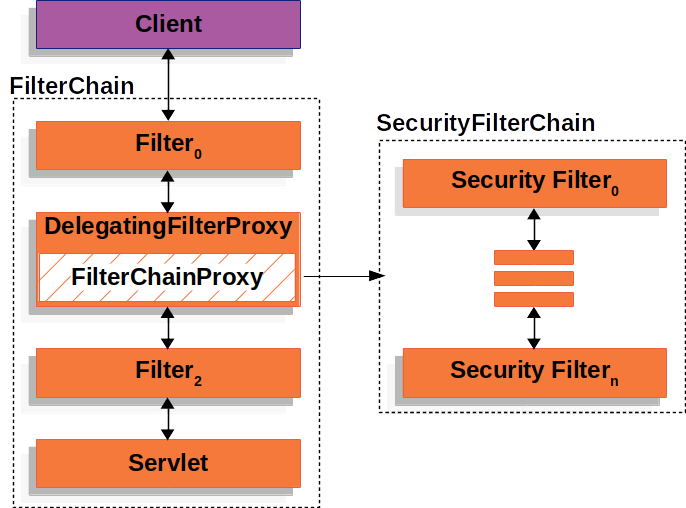
요청은 서블릿 앞단의 FilterChainProxy를 거치고, URL 매칭 규칙에 따라 하나의 SecurityFilterChain이 선택되어 내부 보안 필터들이 등록 순서대로 실행된다. 각 필터는 대부분 OncePerRequestFilter를 확장해 한 요청당 한 번 동작한다. 필터 순서가 곧 보안 정책의 우선순위다.
- 핵심 필터들의 역할
- CorsFilter: 사전 요청 및 CORS 헤더 처리
- CsrfFilter: 상태 저장 환경에서 CSRF 토큰 검증
- UsernamePasswordAuthenticationFilter: 폼 로그인 자격 증명 추출 및 인증 시도
- OAuth2LoginAuthenticationFilter: OAuth2 인가 코드 콜백 처리 및 토큰 교환 트리거
- BearerTokenAuthenticationFilter / 커스텀 JwtAuthenticationFilter: 보호 자원 접근 시 Access Token 검증
- AnonymousAuthenticationFilter: 인증 부재 시 익명 사용자 토큰 주입
- ExceptionTranslationFilter: 인증/인가 예외를 포착하여 401/403으로 표준화
- FilterSecurityInterceptor: URL 접근결정(인가) 수행
- 구성 축
- 인증(authentication)
- 인가(authorization)
- 예외 처리(exception handling)
- 세션/컨텍스트 관리(context management)
2) 로그인 동작 방식: authenticate → SecurityContext 저장 → 재사용

2.1 입력 수집과 인증 시도(UsernamePasswordAuthenticationFilter)
- 사용자가 /login(또는 커스텀 경로)로 아이디/비밀번호를 제출하면 UsernamePasswordAuthenticationFilter가 UsernamePasswordAuthenticationToken(unauthenticated)을 생성합니다.
- 필터는 AuthenticationManager.authenticate(...)를 호출해 인증을 위임합니다.
2.2 ProviderManager와 DaoAuthenticationProvider
- ProviderManager가 지원 가능한 AuthenticationProvider를 순서대로 호출합니다.
- 일반적으로 DaoAuthenticationProvider가 UserDetailsService.loadUserByUsername로 사용자 정보를 로드하고, PasswordEncoder.matches(raw, encoded)로 비밀번호를 검증합니다.
- 성공 시 UsernamePasswordAuthenticationToken(authenticated)을 반환하며, 이 토큰에는 Principal, Authorities, details 등이 채워집니다.
2.3 성공 처리와 SecurityContext 저장
- AbstractAuthenticationProcessingFilter(부모)가 성공 시점에 SecurityContextHolder.getContext().setAuthentication(auth)로 컨텍스트를 채웁니다.
- 컨텍스트의 영속화는 SecurityContextRepository가 담당합니다.
- 상태 저장(기본): HttpSessionSecurityContextRepository가 세션에 컨텍스트를 저장합니다.
- 상태 비저장(Stateless): NullSecurityContextRepository를 사용해 서버 세션에 저장하지 않습니다.
http
  .sessionManagement(sm -> sm.sessionCreationPolicy(SessionCreationPolicy.STATELESS))
  .securityContext(sc -> sc.securityContextRepository(new NullSecurityContextRepository()))
.addFilterBefore(jwtAuthenticationFilter, UsernamePasswordAuthenticationFilter.class);- 상태 저장: 다음 요청 시작 시 SecurityContextRepository가 세션에서 컨텍스트를 불러와 SecurityContextHolder(기본 ThreadLocal 전략)에 주입합니다.
- 상태 비저장: 매 요청마다 JWT(또는 다른 토큰)를 검증하는 필터가 Authentication을 새로 구성해 SecurityContextHolder에 넣습니다.
2.5 컨텍스트의 활용 지점(인가/표현식/메서드 보안)
- URL 인가: FilterSecurityInterceptor에서 SecurityContextHolder.getContext().getAuthentication()을 이용해 접근 결정을 수행합니다.
- 메서드 보안: @PreAuthorize("hasRole('ADMIN')") 등에서 현재 Authentication의 권한을 사용합니다.
- 컨트롤러/서비스에서의 사용:
@GetMapping("/me")
public UserDto me(@AuthenticationPrincipal CustomUser user) { return toDto(user); }

// 또는
Authentication auth = SecurityContextHolder.getContext().getAuthentication();
Object principal = auth.getPrincipal();
2.6 실패 처리와 정리
- 인증 실패 시 예외가 발생하고 ExceptionTranslationFilter가 이를 401로 표준화하거나 로그인 페이지로 리다이렉트합니다.
- 로그아웃 시 LogoutFilter가 SecurityContext를 지우고(상태 저장의 경우 세션 무효화), 상태 비저장 설계에서는 AT 블랙리스트/RT 무효화를 통해 토큰 재사용을 차단합니다.
3) 인가 파이프라인: 누가 무엇에 접근할 수 있는가

- FilterSecurityInterceptor가 요청 URL과 매칭된 권한 요구사항(ConfigAttribute)을 확인
- AccessDecisionManager(기본 AffirmativeBased)가 Voter들의 투표 결과로 접근 허용/거부 결정
- 표준 Voter: RoleVoter, AuthenticatedVoter 등
- 필요 시 도메인 규칙을 반영한 커스텀 Voter 추가
- 거부 시 AccessDeniedException 발생, ExceptionTranslationFilter가 403으로 표준화
4) 예외 처리와 응답 규격
웹앱 기본값은 미인증 시 로그인 페이지로 리다이렉트하는 흐름이다. API 환경에서는 리다이렉트 대신 일관된 JSON 본문을 주는 것이 낫다. 아래처럼 /api/** 경로만 401/403 JSON으로 분기하면 된다.
4.1 JSON 핸들러
// 공통 에러 응답 DTO
public record ApiError(String code, String message) {}

@Component
public class RestAuthenticationEntryPoint implements AuthenticationEntryPoint {
  private final ObjectMapper om = new ObjectMapper();
  @Override
  public void commence(HttpServletRequest req, HttpServletResponse res, AuthenticationException ex) throws IOException {
    res.setStatus(HttpServletResponse.SC_UNAUTHORIZED);
    res.setContentType("application/json;charset=UTF-8");
    om.writeValue(res.getWriter(), new ApiError("UNAUTHORIZED", "인증이 필요합니다."));
  }
}

@Component
public class RestAccessDeniedHandler AccessDeniedHandler {
  private final ObjectMapper om = new ObjectMapper();
  @Override
  public void handle(HttpServletRequest req, HttpServletResponse res, AccessDeniedException ex) throws IOException {
    res.setStatus(HttpServletResponse.SC_FORBIDDEN);
    res.setContentType("application/json;charset=UTF-8");
    om.writeValue(res.getWriter(), new ApiError("FORBIDDEN", "권한이 없습니다."));
  }
}
4.2 SecurityFilterChain 설정
@Bean
SecurityFilterChain securityFilterChain(HttpSecurity http,
    RestAuthenticationEntryPoint restEntryPoint,
    RestAccessDeniedHandler restDeniedHandler) throws Exception {

  http
    .csrf(csrf -> csrf.disable())
    .sessionManagement(sm -> sm.sessionCreationPolicy(SessionCreationPolicy.STATELESS))
    .authorizeHttpRequests(auth -> auth
        .requestMatchers("/api/**").authenticated()
        .anyRequest().permitAll()
    )
    .exceptionHandling(ex -> ex
        // /api/**는 JSON (401/403)
        .defaultAuthenticationEntryPointFor(restEntryPoint, new AntPathRequestMatcher("/api/**"))
        .defaultAccessDeniedHandlerFor(restDeniedHandler, new AntPathRequestMatcher("/api/**"))
        // 그 외는 기존 로그인 페이지 리다이렉트
        .authenticationEntryPoint(new LoginUrlAuthenticationEntryPoint("/login"))
    );

  // JWT 필터가 있다면 UsernamePasswordAuthenticationFilter 앞에 삽입
  // http.addFilterBefore(jwtAuthenticationFilter, UsernamePasswordAuthenticationFilter.class);

  return http.build();
}
5) OAuth2는 이렇게 돈다(Authorization Code)
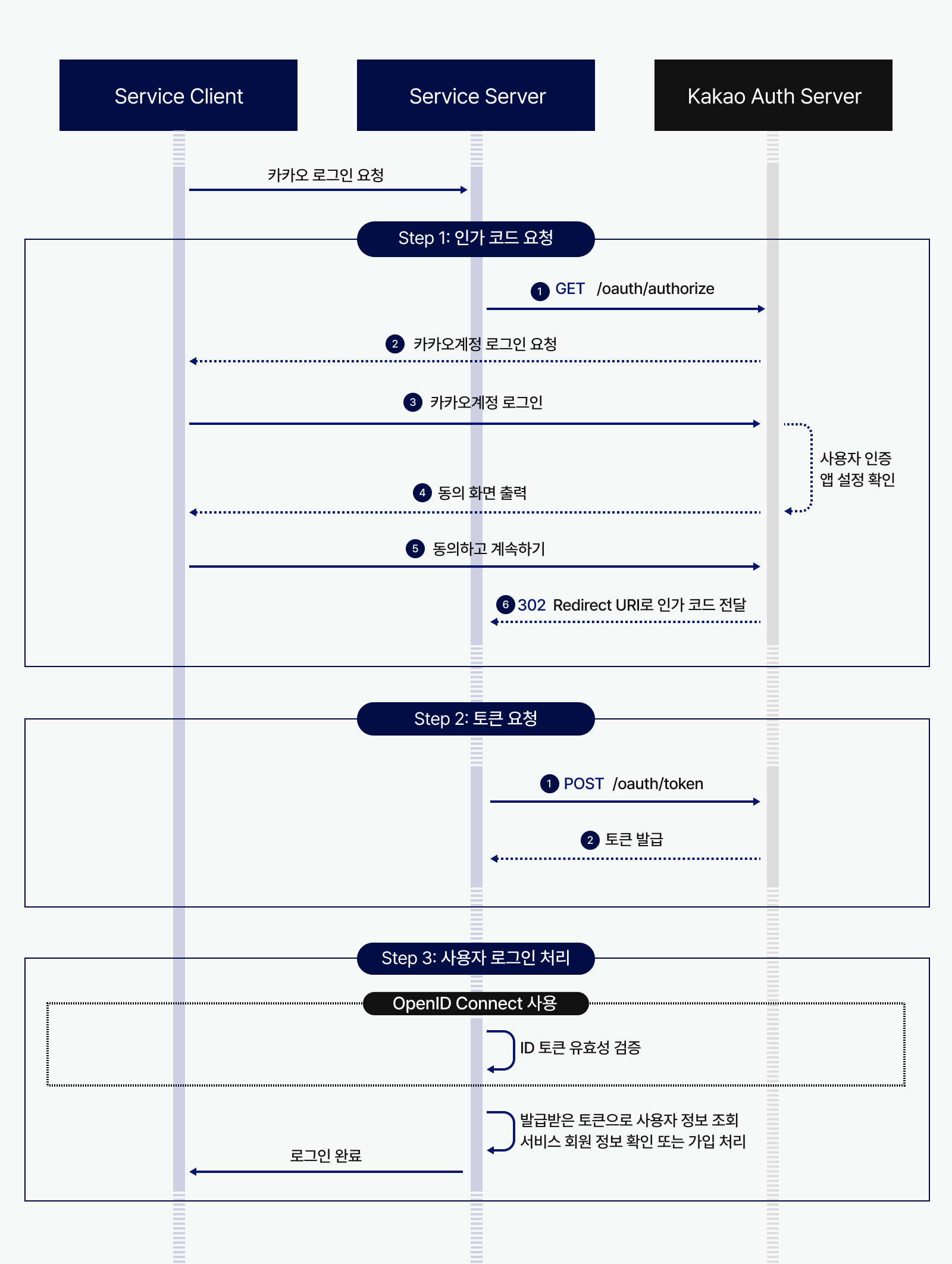
- 인가 요청: 클라이언트가 /oauth2/authorization/{registrationId}로 진입하면 AuthorizationEndpoint가 state를 포함한 인가 요청을 생성해 공급자(카카오/구글 등)로 리다이렉트
- 사용자 인증/동의: 공급자 화면에서 로그인/스코프 동의
- 콜백: 공급자가 앱의 Redirect URI로 Authorization Code를 전달. 이때 state를 검증해 요청 위조 차단
- 토큰 교환: OAuth2LoginAuthenticationFilter가 코드로 AT, RT 교환
- 사용자 정보 로드: UserInfoEndpoint가 공급자 API로 사용자 프로필 조회, CustomOAuth2UserService가 도메인 사용자와 매핑
- 성공/실패 처리: OAuth2AuthenticationSuccessHandler에서 애플리케이션 고유 토큰 발급·쿠키 세팅·리다이렉트. 실패 시 FailureHandler가 오류 경로로 전송
6) 폼 로그인 vs 소셜 로그인: 무엇이 다르고 무엇이 같은가
6.1 시작 지점과 트리거
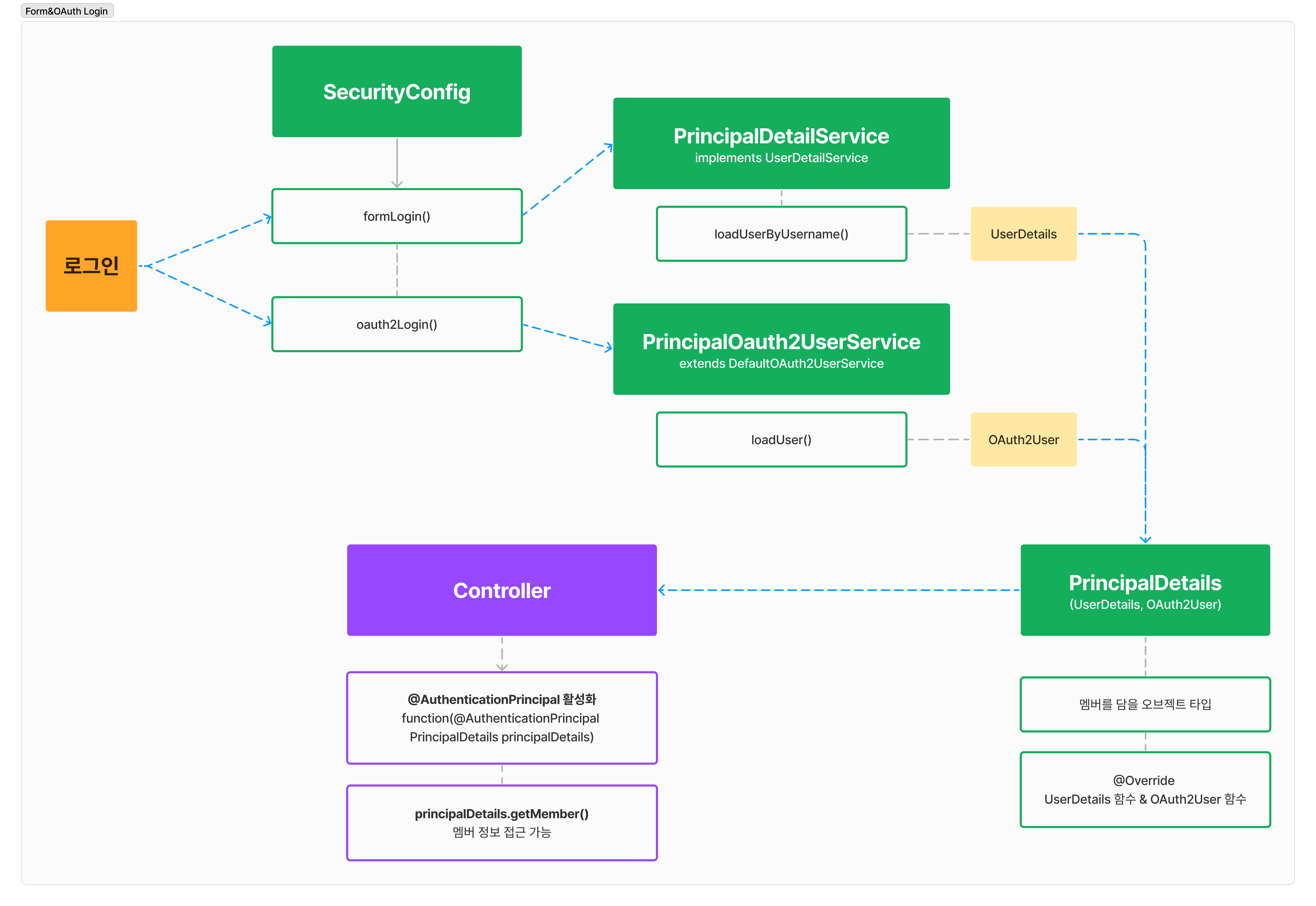
- 폼 로그인: 애플리케이션이 /login(또는 커스텀)에서 UsernamePasswordAuthenticationFilter를 통해 AuthenticationManager.authenticate(...)를 직접 트리거합니다.
- 소셜 로그인: 클라이언트가 /oauth2/authorization/{registrationId}로 진입하면 Spring Security의 oauth2Login() 플로우가 시작되고, 콜백 시 OAuth2LoginAuthenticationFilter가 토큰 교환을 수행합니다.
6.2 자격 증명과 사용자 정보 취득
- 폼 로그인: 자격 증명은 아이디/비밀번호이며, DaoAuthenticationProvider가 UserDetailsService로 사용자 조회 + PasswordEncoder로 검증합니다.
- 소셜 로그인: 자격 증명은 공급자 발급 코드/토큰이며, DefaultAuthorizationCodeTokenResponseClient(또는 커스텀)가 토큰 교환 후 UserInfoEndpoint + CustomOAuth2UserService로 프로필을 로드합니다.
6.3 SecurityContext 채우기와 저장소
- 공통: 인증 성공 시점에 SecurityContextHolder.getContext().setAuthentication(auth)로 컨텍스트를 채웁니다.
- 상태 저장: HttpSessionSecurityContextRepository가 세션에 저장(둘 다 동일).
- 상태 비저장: 둘 다 세션을 쓰지 않고, 매 요청마다 JWT 필터가 Authentication을 재구성합니다.
6.4 후처리와 토큰 정책
- 공통: 성공/실패 핸들러를 통해 리다이렉트, 쿠키/헤더 세팅, 감사 로깅이 수행됩니다.
- 폼 로그인: 성공 시 애플리케이션이 자체 JWT(AT/RT)를 발급해 응답합니다.
- 소셜 로그인: 성공 핸들러(OAuth2AuthenticationSuccessHandler)에서 동일하게 애플리케이션 JWT를 발급하고, RT를 HttpOnly Secure 쿠키로 설정합니다.
6.5 동일하게 유지되는 것들(핵심 인프라 공유)
- 인가 파이프라인, 권한 모델, SecurityContext 활용 방식은 동일합니다.
- 관측(요청 ID, 로그인/재발급 로그), 블랙리스트/회원 상태 점검, 오픈 리다이렉트 방지 정책 또한 동일하게 적용합니다.
7) 결론
Spring Security는 필터 체인을 중심으로 인증·인가·예외 처리를 모듈화하고, OAuth2는 인가 코드 표준 시퀀스를 통해 소셜 로그인을 일관되게 추상화한다. 우리는 여기에 JWT/쿠키 정책/재발급 예외 경로/블랙리스트만 얇게 얹어 운영 가능성을 확보한다.
'WIL > 웹 개발' 카테고리의 다른 글
| UserDetailsService.loadUserByUsername에 파라미터를 추가하고 싶을 때: 불가능한 이유와 대안 (0) | 2025.10.10 |
|---|---|
| Next.js + TypeScript + App Router 환경에서 tsconfig 타입 꼬임 (0) | 2025.03.27 |
| Windows에서 Docker로 Ubuntu 서버 만들기 2: Ubuntu 개발 환경 초기 설정 (0) | 2025.03.24 |
| Windows에서 Docker로 Ubuntu 서버 만들기 1 (0) | 2025.03.11 |
| 프로토타입과 클래스 (0) | 2024.12.11 |